
Every document. Every detail.
Six kinds of trace that manipulation, fabrication and reuse leave behind. Each finding names what was found, marks it on the page and tells your reviewer what to check next.
The six signs
Changed amounts
A total, date or name was edited after the document was issued.
Hidden content
Something on the page was covered over so a reader wouldn't see it.
Edited files
The file passed through editing software instead of coming straight from the business.
AI-made documents
The document or photo was generated or altered with AI.
Numbers that don't add up
Line items, taxes or balances don't match the printed totals.
Repeats across claims
The same document, invoice number, bank account or design turns up on different claims.
Examples come from Assaya's sample documents.
Every document a claim runs on.
- Repair estimates and invoices
- Receipts, hotel bills, taxi and ride receipts
- Medical bills
- Pay stubs
- Bank statements
- Photos and scans of any of these
Expense receipts get more checks: the card charge, the trip's dates and receipts never printed. Travel and expense
Proof before payout.
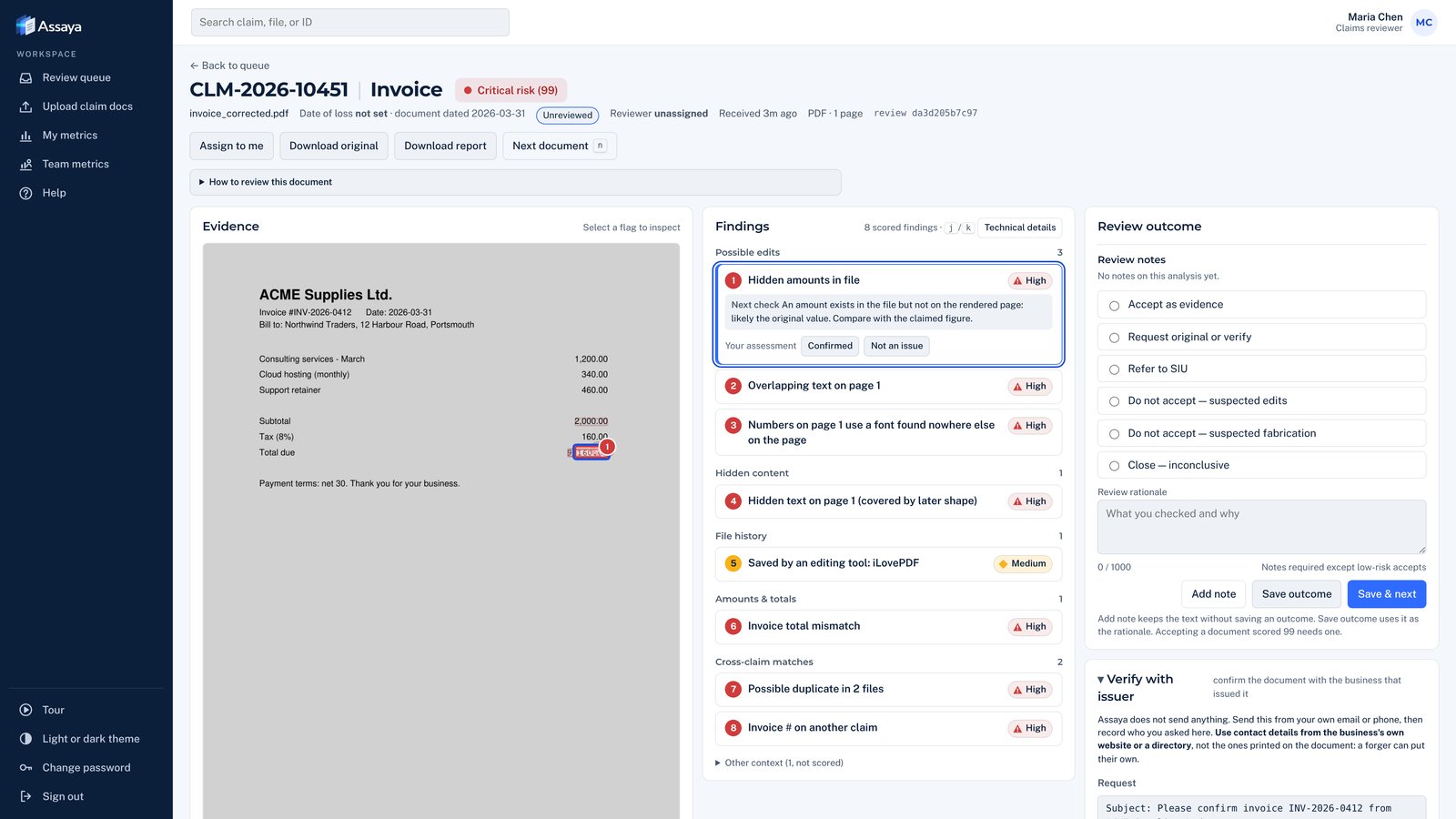
See how Assaya highlights suspicious findings, explains what triggered them and gives reviewers what they need to take the next step. A focused 30-minute walkthrough; no sensitive documents required.